Wednesday, January 11, 2012

Making JSF 2.0 Composite Components Ajax render-capable

If you for example have the following composite component in a JSF 2.0 Facelets XHTML template:

<sc:block title="Followers">

<h:panelGroup rendered="#{not empty userShow.user.followedByUsers}">

<ul>

<ui:repeat var="user" value="#{userShow.user.followedByUsers}">

<li><sc:user_link user="#{user}"/></li>

</ui:repeat>

</ul>

</h:panelGroup>

<h:panelGroup rendered="#{empty usefollowedByUsers}">

#{userShow.user.name} has no followers.

</h:panelGroup>

</sc:block>

and try do ajax render:

<a4j:commandButton value="Follow" action="#{userBean.follow(currentUser, userShow.user)}"

render="followPanel followers"

rendered="#{not currentUser.isFollowing(userShow.user)}"/>

This won't work for some reason. Wrong workaround is using a h:panelGroup and moving the id for ajax render there:

<sc:block title="Followers">

<h:panelGroup id="followers">

<h:panelGroup rendered="#{not empty userShow.user.followedByUsers}">

<ul>

<ui:repeat var="user" value="#{userShow.user.followedByUsers}">

<li><sc:user_link user="#{user}"/></li>

</ui:repeat>

</ul>

</h:panelGroup>

<h:panelGroup rendered="#{empty us.followedByUsers}">

#{userShow.user.name} has no followers.

</h:panelGroup>

</h:panelGroup>

</sc:block>

The correct solution is to put a #{cc.clientId} like below in the composite implementation:

<composite:implementation>

<section id="#{cc.clientId}" class="block">

<div class="block-inner clearfix">

<h2 class="block-title">#{cc.attrs.title}</h2>

<div class="block-content content">

<composite:insertChildren/>

</div>

</div>

</section>

</composite:implementation>

To learn more about Java Web Development using Java EE 6, I highly recommend The Java EE 6 Tutorial: Basic Concepts (4th Edition) (Java Series) by Eric Jendrock, Ian Evans, Devika Gollapudi and Kim Haase.

Thursday, December 22, 2011

Fix Jackson/JAXB JSON Serialization Problem with Spring Data Neo4j @NodeEntity Objects

Spring Data Neo4j @NodeEntity-annotated objects are proxy-enriched by Spring Data Neo4j aspects using AspectJ. There are times we want to expose these objects via JAX-RS REST API or JAX-WS / SOAP web services and then (by default) we will have problems.

The error stacktrace messages (here using JBoss AS 7.0.2) are along the lines of:

HTTP Status 500 - org.codehaus.jackson.map.JsonMappingException: No serializer found for class org.neo4j.graphdb.DynamicRelationshipType and no properties discovered to create BeanSerializer (to avoid exception, disable SerializationConfig.Feature.FAIL_ON_EMPTY_BEANS) ) (through reference chain: com.satukancinta.domain.User["enjoyActivities"]->org.springframework.data.neo4j.fieldaccess.ManagedFieldAccessorSet[0]->com.satukancinta.domain.Activity["persistentState"]->org.neo4j.rest.graphdb.entity.RestNode["relationships"]->org.neo4j.rest.graphdb.entity.RestRelationship["type"])


type Status report

message org.codehaus.jackson.map.JsonMappingException: No serializer found for class org.neo4j.graphdb.DynamicRelationshipType and no properties discovered to create BeanSerializer (to avoid exception, disable SerializationConfig.Feature.FAIL_ON_EMPTY_BEANS) ) (through reference chain: com.satukancinta.domain.User["enjoyActivities"]->org.springframework.data.neo4j.fieldaccess.ManagedFieldAccessorSet[0]->com.satukancinta.domain.Activity["persistentState"]->org.neo4j.rest.graphdb.entity.RestNode["relationships"]->org.neo4j.rest.graphdb.entity.RestRelationship["type"])

description The server encountered an internal error (org.codehaus.jackson.map.JsonMappingException: No serializer found for class org.neo4j.graphdb.DynamicRelationshipType and no properties discovered to create BeanSerializer (to avoid exception, disable SerializationConfig.Feature.FAIL_ON_EMPTY_BEANS) ) (through reference chain: com.satukancinta.domain.User["enjoyActivities"]->org.springframework.data.neo4j.fieldaccess.ManagedFieldAccessorSet[0]->com.satukancinta.domain.Activity["persistentState"]->org.neo4j.rest.graphdb.entity.RestNode["relationships"]->org.neo4j.rest.graphdb.entity.RestRelationship["type"])) that prevented it from fulfilling this request.

To solve this problem, annotate your entity class with @JsonAutoDetect(JsonMethod.NONE) :

import org.codehaus.jackson.annotate.JsonAutoDetect;

import org.codehaus.jackson.annotate.JsonMethod;

import org.codehaus.jackson.annotate.JsonProperty;


@NodeEntity @JsonAutoDetect(JsonMethod.NONE)

public class User implements NodeBacked {

then manually annotate each property you want to serialize with @JsonProperty :

@JsonProperty

public String getName() {

return name;

}

Now the JAX-RS Application works as intended and everybody is happy. :-) There's also a StackOverflow thread that discusses this problem.

To learn more about Java Web Development using Java EE 6, I highly recommend The Java EE 6 Tutorial: Basic Concepts (4th Edition) (Java Series) by Eric Jendrock, Ian Evans, Devika Gollapudi and Kim Haase.

How to Resolve Spring Data Neo4j / Jersey / Jackson Conflict with JBoss AS 7 RESTEasy

I'm using Spring Data Neo4j REST Client which uses Jersey JAX-RS Client. Unfortunately when deployed to JBoss AS 7.0.2, it conflicts with the built-in RESTEasy deployer (bug DATAGRAPH-159).

In order to run the application, jersey-server must be excluded :

<dependency> <groupId>org.springframework.data</groupId> <artifactId>spring-data-neo4j-rest</artifactId> <version>${spring-data-neo4j.version}</version> <exclusions> ... <exclusion> <artifactId>jersey-server</artifactId> <groupId>com.sun.jersey</groupId> </exclusion> </exclusions> </dependency>

Another issue I came across is my web application is also a JAX-RS Service Application, therefore it requires JBoss RESTEasy. Unfortunately Jackson JSON Provider which is a dependency of Neo4j REST Client and Jersey JAX-RS Client conflicts with RESTEasy's Jackson Provider, with the following exception stacktrace message:

java.lang.RuntimeException: Unable to instantiate MessageBodyReader  org.jboss.resteasy.spi.ResteasyProviderFactory.registerProvider(ResteasyProviderFactory.java:760)  org.jboss.resteasy.spi.ResteasyProviderFactory.registerProvider(ResteasyProviderFactory.java:742)  org.jboss.resteasy.spi.ResteasyDeployment.registerProvider(ResteasyDeployment.java:505)  org.jboss.resteasy.spi.ResteasyDeployment.registration(ResteasyDeployment.java:305)  org.jboss.resteasy.spi.ResteasyDeployment.start(ResteasyDeployment.java:225)  org.jboss.resteasy.plugins.server.servlet.ServletContainerDispatcher.init(ServletContainerDispatcher.java:67)  org.jboss.resteasy.plugins.server.servlet.HttpServletDispatcher.init(HttpServletDispatcher.java:36)  org.jboss.as.web.security.SecurityContextAssociationValve.invoke(SecurityContextAssociationValve.java:139)  org.jboss.as.web.NamingValve.invoke(NamingValve.java:57)  org.apache.catalina.valves.ErrorReportValve.invoke(ErrorReportValve.java:102)  org.apache.catalina.connector.CoyoteAdapter.service(CoyoteAdapter.java:362)  org.apache.coyote.http11.Http11AprProcessor.process(Http11AprProcessor.java:897)  org.apache.coyote.http11.Http11AprProtocol$Http11ConnectionHandler.process(Http11AprProtocol.java:626)  org.apache.tomcat.util.net.AprEndpoint$Worker.run(AprEndpoint.java:2054)  java.lang.Thread.run(Thread.java:722)

root cause

java.lang.RuntimeException: Illegal to inject a message body into a singleton into public org.codehaus.jackson.jaxrs.JacksonJsonProvider(org.codehaus.jackson.map.ObjectMapper,org.codehaus.jackson.jaxrs.Annotations[])  org.jboss.resteasy.core.MessageBodyParameterInjector.inject(MessageBodyParameterInjector.java:209)  org.jboss.resteasy.core.ConstructorInjectorImpl.injectableArguments(ConstructorInjectorImpl.java:63)  org.jboss.resteasy.core.ConstructorInjectorImpl.construct(ConstructorInjectorImpl.java:129)  org.jboss.resteasy.spi.ResteasyProviderFactory.getProviderInstance(ResteasyProviderFactory.java:1038)

I thought this was issue RESTEASY-503, because JBoss AS 7.0.2 happened to use the somewhat buggy RESTEasy 2.2.1.GA. But it turns out there is an easy fix to this problem, thanks to Configuring Module Classloading in JBoss AS 7.

Edit src/main/webapp/WEB-INF/jboss-deployment-structure.xml as follows:


<jboss-deployment-structure xmlns="urn:jboss:deployment-structure:1.0">

<deployment>

<dependencies>

<module name="org.codehaus.jackson.jackson-jaxrs"/>

<module name="org.codehaus.jackson.jackson-core-asl"/>

<module name="org.codehaus.jackson.jackson-mapper-asl"/>

</dependencies>

</deployment>

</jboss-deployment-structure>

Now Spring Data Neo4j, Jersey Client with JSON Jackson Provider, and my JAX-RS Application served by RESTEasy, all can coexist in the same web application WAR. :-)

To learn more about Java Web Development using Java EE 6, I highly recommend The Java EE 6 Tutorial: Basic Concepts (4th Edition) (Java Series) by Eric Jendrock, Ian Evans, Devika Gollapudi and Kim Haase.

Wednesday, December 7, 2011

I don't "get" JSON Output in Pentaho Data Integration (PDI) / Kettle

I don't understand how to use the JSON Output step properly in Kettle aka Pentaho Data Integration (PDI).

With "Nr of rows in a bloc" set to 0 or 3, I got:

{
  "categories": [
    {
      "code": "WORKAHOLIC-CHIC"
    },
    {
      "name": "Workaholic Chic"
    },
    {
      "description": "Move ! Move ! move...!!\nLight Up Your Day... with a perfect match, \nPadanan busana kerja Professsional look, Powerfull & Fashionable,\nwhich got several design for different mood,  multifunction,\nMemorable style!\nLet’s be and stay Tuneeca...\n"
    }
  ]
}

which is basically only the last record.

With "Nr of rows in a bloc" set to 1, I got:

{
  "categories": [
    {
      "code": "AKSESORI-LIGHT-UP-YOUR-DAY"
    },
    {
      "name": "Aksesori Light Up Your Day"
    },
    {
      "description": "-"
    },
    {
      "code": "AKSESORIS-APRIL-2009"
    },
...

What I'm trying to get is:

{ "categories": [
  { "code": "AKSESORI-LIGHT-UP-YOUR-DAY",
     "name": "Aksesori Light Up Your Day"
     "description": "Very cool" },
  { "code": .........

Contrast this with the XML Output, which I get the following correct output right from first try:

<?xml version="1.0" encoding="UTF-8"?>
<categories>
  <category>
    <code>AKSESORI-LIGHT-UP-YOUR-DAY</code>
    <name>Aksesori Light Up Your Day</name>
    <description>-</description>
  </category>
  <category>
    <code>AKSESORIS-APRIL-2009</code>
...

An additional plus is that XML Output already performs a bit of output pretty formatting, which I appreciate very much. (JSON Output outputs everything in a single line)

Those two Output steps gets the same input data.

Any ideas ?

Wednesday, October 26, 2011

Seam Framework Java EE Library version 3.1.0.Beta4 Released

As per usual, let's get the links out of the way first:

Download Seam 3.1.0.Beta4

Reference Documentation

API Documentation

a
Report Issues

For Maven users, there is a new version of the Seam Bill of Materials:

<dependency> <groupId>org.jboss.seam</groupId> <artifactId>seam-bom</artifactId> <version>3.1.0.Beta4</version> <type>pom</type> <scope>import</scope> </dependency>

I know that we promised a CR1 release for Seam 3.1 at about this time, however the Seam QA team have done their jobs a little too well and identified a number of issues with the Beta3 release which we wanted to get fixed before we go to a candidate release. The great news for this release is that we've fixed 68 issues - you can view the issue list here:

https://issues.jboss.org/secure/IssueNavigator.jspa?mode=hide&requestId=12315988

Included in this release is a number of new features, improved documentation and a brand new Arquillian-based structure for our test suites to make it easier to test each module on multiple containers. We've also squashed a great deal of bugs, improved stability, plus made a number of other minor improvements.

As we still have quite a few open issues remaining for the Seam 3.1 release, we will likely release another beta in the next couple of weeks. We want this release to be rock solid, so please try out the beta and let us know if you find any problems.

(Article copied verbatim from in.relation.to)

To learn more about Java Web Development using Java EE 6, I highly recommend The Java EE 6 Tutorial: Basic Concepts (4th Edition) (Java Series) by Eric Jendrock, Ian Evans, Devika Gollapudi and Kim Haase.

Friday, September 30, 2011

m2e/m2eclipse-wtp 0.14.0 Released: Eclipse IDE Integration for Java EE 6 / Web Application Maven projects

Maven Integration for Eclipse WTP 0.14.0, a.k.a m2eclipse-wtp, a.k.a m2e-wtp is out the door. This new release brings its share of new features and enhancements, as well as a bunch of bug fixes. The complete release notes are available here.

m2e-wtp 0.14.0 works with Eclipse Helios and Indigo, requires at least m2e 1.0 and mavenarchiver plugin > 0.14.0 (0.15.0 should be automatically installed). As usual, m2e-wtp can be installed from :

So what's new and noteworthy in 0.14.0? Let's see :

New support for Application Client projects

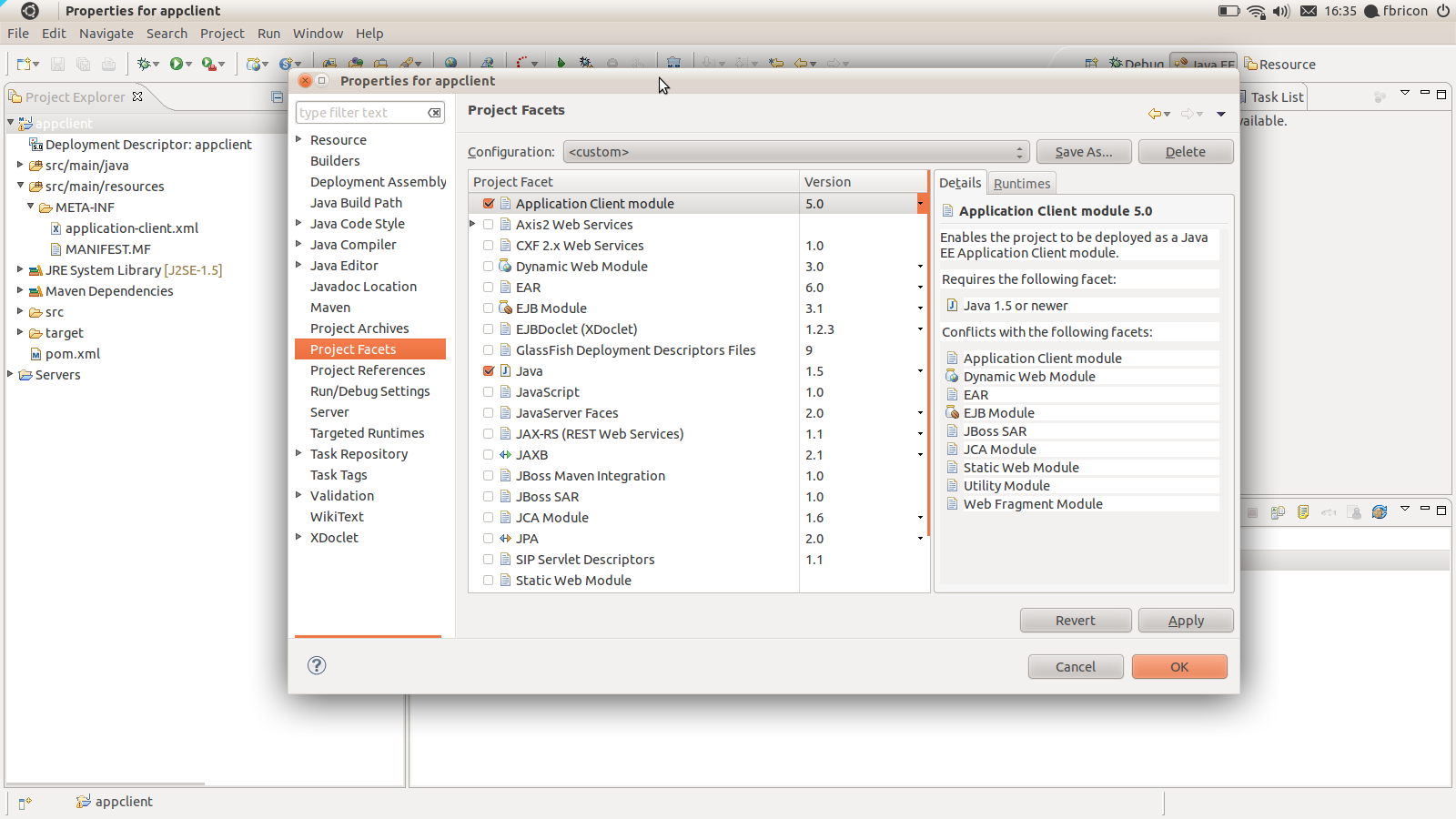
Application Client packaging has been introduced with the new maven-acr-plugin. Support for app-client type dependencies has been added in maven-ear-plugin 2.6. Since Application Client projects are natively supported in WTP, we added a new configurator for app-client projects. When an app-client project is imported / configured via m2e, the Application Client Facet will be automatically installed, its version inferred from the contents of META-INF/application-client.xml. Filtering of the deployment descriptor is supported.

<plugin>
  <groupId>org.apache.maven.plugins</groupId>
  <artifactId>maven-acr-plugin</artifactId>
  <version>1.0</version>
  <extensions>true</extensions>
  <configuration>
    <archive>
      <manifest>
        <mainClass>foo.bar.appclient.Main</mainClass>
      </manifest>
    </archive>
    <filterDeploymentDescriptor>true</filterDeploymentDescriptor>
  </configuration>
</plugin>

appclient.png

New support for Web Fragment projects

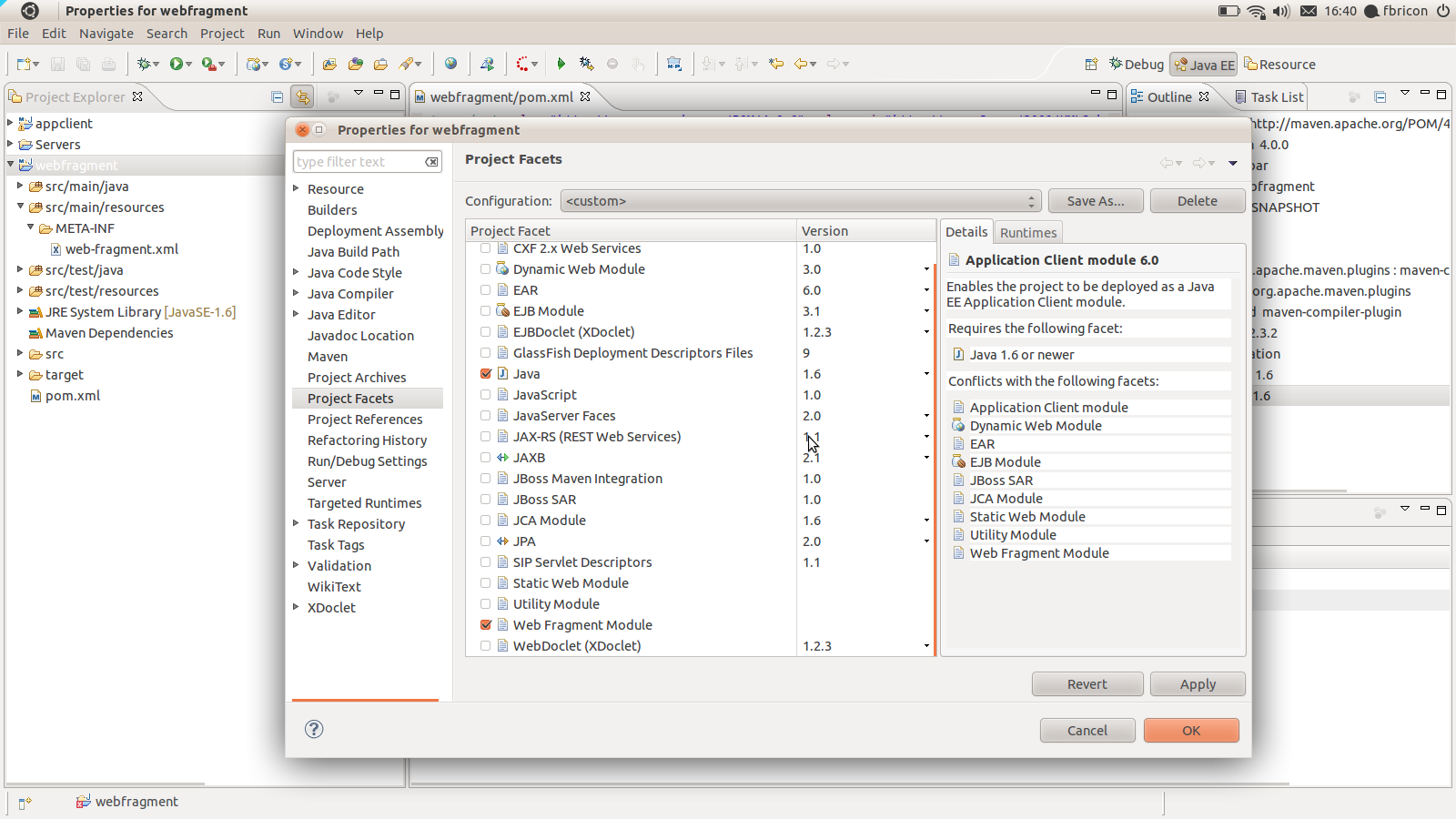
If a project contains a META-INF/web-fragment.xml in it's compilation output folder, the Web Fragment Facet is automatically installed upon maven project configuration (the Utility Facet is removed if necessary). Note that, as per the Java EE6 spec - and WTP is very picky about it-, Web Fragment projects *must* use Java 1.6. Failure to comply will fail the configuration and an error marker will be displayed.

webfragment.png

The use of target/m2e-wtp/web-resources is now optional

On some occasions however, having target/m2e-wtp/web-resources/ might cause some troubles (incompatibilities with WTP editors, IBM RAD, using Servlet.getRealPath(...) in your code).
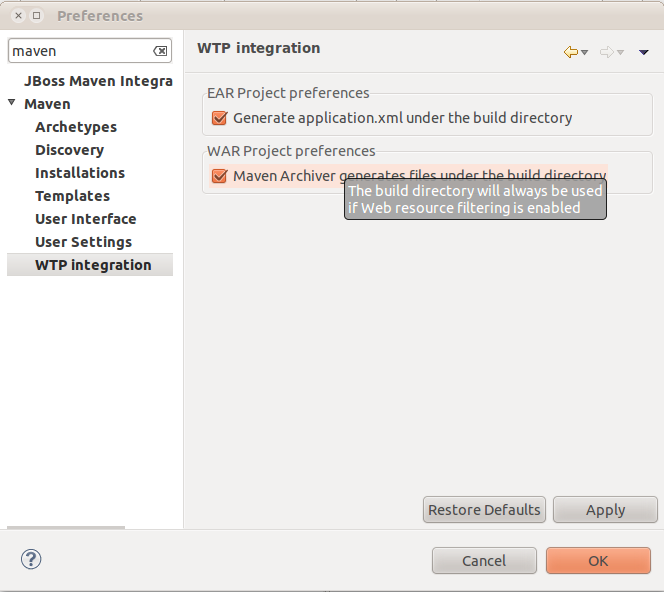
As a workaround, you can choose to not use target/m2e-wtp/web-resources/ and generate the pom.properties and MANIFEST.MF files in your source directory instead (It'll be your responsibility to add these files to your SCM ignore list).
In order to remove target/m2e-wtp/web-resources/ from the list of deployed folders, you need to change some preferences :
  • on your project only : right-click on the project > Properties > Maven > WTP : check "Enable Project Specific Settings" and uncheck "Maven Archiver generates files under the build directory"
  • on the whole workspace : Window > Preferences > Maven > WTP : uncheck "Maven Archiver generates files under the build directory"

war-preferences.png
Please note that this setting will be overridden if web resource filtering is in use, that is if the maven-war-plugin configuration declares <webResources> or sets <filterDeploymentDescriptor> to true. The reason is simple : you don't want to see your source files overwritten by the filtering mechanism (and it would also lead to some not-so-funny build loops).

Custom file name mapping for web project dependencies

Since the maven-war-plugin allows file name customization for librairies and TLDs, based on patterns (http://maven.apache.org/plugins/maven-war-plugin/examples/file-name-mapping.html), we added the the same feature in m2e-wtp. That will allow you to use a version-less name mapping for dependencies, like :

<plugin>
  <groupId>org.apache.maven.plugins</groupId>
  <artifactId>maven-war-plugin</artifactId>
  <version>2.1.1</version>
  <configuration>
    <outputFileNameMapping>@{groupId}@-@{artifactId}@.@{extension}@</outputFileNameMapping>
  </configuration>
</plugin>

The trick here is, in order to support non default filename mappings of dependencies listed in the Maven Library, the artifact is copied to the build directory (the target/ folder by default) under its new name. So if you happen to run a clean build of your project, wiping out that directory, you will need to manually run "Maven > Update Project configuration" on your project.

Option to not publish overlay changes automatically

In order to support publishing of overlay changes automatically, m2e-wtp aggressively cleared the cache of the servers your application is deployed to. However, The overlay feature still being in an experimental state, we decided to be more conservative with regard to server publishing, so a new "Automatically republish servers on overlay modification" preference has been added to Window > Preferences > Server > Overlays.

overlay-republishing-preference.png
Overlays support is not bound to Maven, that's why it's under the Server preferences.

Support for the new tag="defaultRootSource" introduced in WTP 3.3.1

When several source folders are declared in the .settings/org.eclipse.wst.common.component file, WTP prior to 3.3.1 (Indigo SR1) tended to generate files (web.xml, faces-config.xml, ...) in the first folder it found. Since web projects define target/m2e-wtp/web-resources as the first source folder (target/m2e-wtp/ear-resources/ for EAR projects), that would cause some issues. In WTP 3.3.1, a new tag has been introduced, designed to indicate which source folder should be used by default, when files need to be looked for / generated. m2e-wtp now adds this tag when WTP 3.3.1 is installed :

<project-modules id="moduleCoreId" project-version="1.5.0">
    <wb-module deploy-name="web-0.0.1-SNAPSHOT">
        <wb-resource deploy-path="/" source-path="/target/m2e-wtp/web-resources"/>
        <wb-resource deploy-path="/" source-path="/src/main/webapp" tag="defaultRootSource"/>
        <wb-resource deploy-path="/WEB-INF/classes" source-path="/src/main/java"/>
         <property name="context-root" value="multi-web"/>
        <property name="java-output-path" value="/multi-web/target/classes"/>
    </wb-module>
</project-modules>

A bit of documentation

As many projects, unfortunately, m2e-wtp doesn't shine in the documentation area. I've been using the github Wiki (https://github.com/sonatype/m2eclipse-wtp/wiki) to start a relatively modest FAQ. I'm planning on adding more content in the near future, but I'm also hoping the community at large will want to contribute some docs of its own. You just need a github account to be able to edit the Wiki.


As always, if you find any issue, please open a bug report at https://issues.sonatype.org/browse/MECLIPSEWTP (and don't forget to attach some test projects).

Happy coding.

Fred.
https://twitter.com/#!/fbricon

(the article above is copied verbatim from Planet JBoss)

Hendy's personal note:
To learn more about Java Web Development using Eclipse IDE and Java EE 6, I highly recommend The Java EE 6 Tutorial: Basic Concepts (4th Edition) (Java Series) by Eric Jendrock, Ian Evans, Devika Gollapudi and Kim Haase.

Monday, September 19, 2011

JBoss Tools 3.3.0.M3 Released: Eclipse Plug-ins for Java EE 6 + JSF 2.0 Web Development

It's time for a new fresh milestone update of JBoss Tools:

grease_jboss_tools.png

3.3 M3 (Greased Lightning)

[Download] [Update Site] [What's New] [Forums] [JIRA] [Twitter]


JBoss Tools is a set of plugins for Eclipse Java IDE that complements, enhances and goes beyond the support that exist for JBoss and related technologies in the default Eclipse distribution. For this release we continue to move Maven, CDI, Java EE 6 support forward and also add in a few new "surprise" features.

To know more about Java EE 6, I highly recommend The Java EE 6 Tutorial: Basic Concepts (4th Edition) (Java Series) by Eric Jendrock, Ian Evans, Devika Gollapudi and Kim Haase


Installation


As always, get and install Eclipse 3.7 (Indigo) JEE bundle - with the JEE bundle you majority of the dependencies letting you save bandwidth:


Once you have installed Eclipse, you either find us on Eclipse Marketplace under "JBoss Tools (Indigo)" or use our update site directly.


The updatesite URL to use from Help > Install New Software... is:


http://download.jboss.org/jbosstools/updates/development/indigo/


Maven Profile Selection

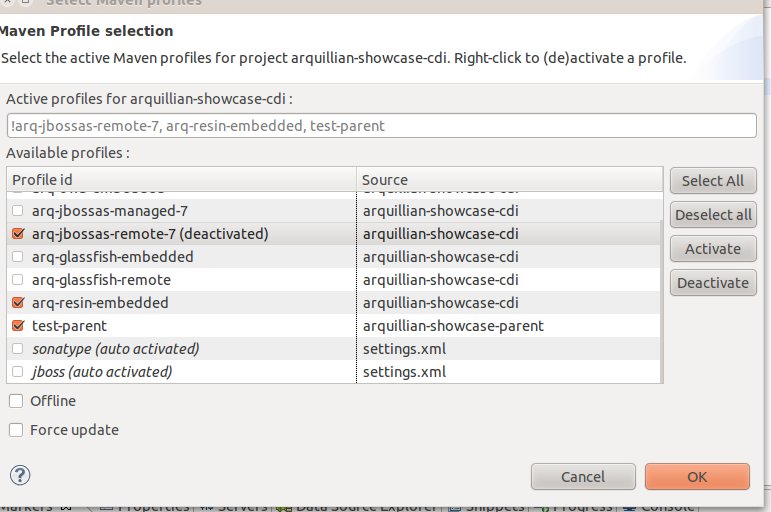
In this release we've therefore included an UI which allows you to easily set/change the profiles on single and multiple projects.


This is especially something that becomes useful when you use Arquillian where it is a common practice to use Maven profiles to toggle the various dependency sets for each server you wish to test against.


It works by you selecting the relevant project(s), press Ctrl+Alt+P or use Maven > Select Maven Profiles... and a dialog box appears allowing you to enable/disable the available profiles for the project(s):


maven-profile-selection-single-project.jpg


Easier Remote Debugging

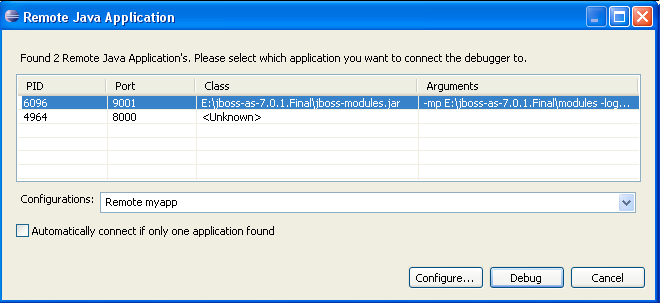
Ever been tired of having to manually configure ports, projects and source path lookups for debugging on Remote Applications in Eclipse ?


We are, especially after we learned that JVM's running on Hotspot provides API to discover such applications and allow for easy configuration of your debugger. In this release we've thus added a command available from Debug As... > Remote Java Application... in the context menu on any set of resources.


Once you select this command, we use the Hotspot API to discover the remote running applications, allows you to select which you application want to connect to and then we do the tedious work of configuring the ports, names and source code lookups (including maven dependencies if applicable) for your Remote debugging.


remote-debugging2.png

No need for manual tweaking anymore.


Thanks to Aslak Knutsen for bringing us the idea and initial code to make this happen!


Running Server Detection

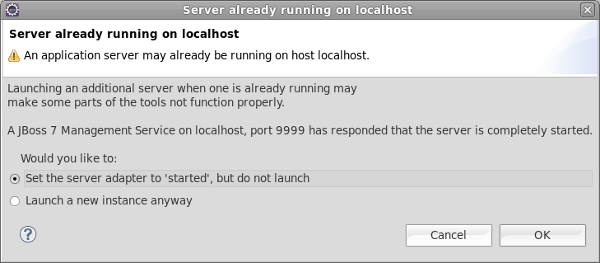
The server adapters now attempt to detect if a server is already running to avoid port conflicts and UI inconcistencies. If a server is detected running you are shown a dialog allowing you to choose to either have the server adapter assume it is already running or force the launch anyway.


server-already-running.png

CDI & Seam Solder

The CDI tooling adds a bunch of quickfixes to have JBoss Tools fix common issues. To aid in searching and navigating your CDI application, Find References (Ctrl+Shift+G) will now show the full list of injection points and EL usage of your beans and Seam Solder and Config annotations and XML now have easy hyperlink navigation to it's declarations.

@ManagedBean's

The JSF tooling now detects @ManagedBean annotations. This avoids false warnings/errors when importing JSF 2 examples. Do consider using @Named instead for better integration into the JavaEE stack.


SAR Projects

For a long time we have been asked about providing support for SAR style projects for use on older versions of JBoss AS. This style of project packaging is now supported both in pure WTP style projects and via Maven.


GWT Tools are back

Since last time, Google released their GWT eclipse plugin in a version that supports Eclipse 3.7 allowing us to reenable the GWT Tools.


And more...

There are additional bugfixes and more features to browse over at What's New & Noteworthy


Like the new features ? Leave a comment to let us know!


And by all means,

Have fun!


To know more about Java EE, I highly recommend Java EE 7 Essentials: Enterprise Developer Handbook by Arun Gupta.


(Article reblogged from JBoss Tools blog)