Showing posts with label Java Web Development. Show all posts

Saturday, December 27, 2014

Trying Thymeleaf for one day: Why is it so hard?

In a project that uses fully stateless server-side frontend, I tried to use Spring MVC with Thymeleaf, using Spring Boot conventions. I've been using Apache Wicket for 2-3 years already so I'm definitely new with Thymeleaf ways, but I have some experience with Spring MVC. The reason why I wanted to use Spring MVC instead of Wicket is because if the app is entirely stateless, I won't be using like 90% of what Wicket is good for (statefulness and component-based framework).

My feelings? Since it's just one day there are definitely lots of things I might be missing out... but at this point I'm somewhat demotivated by Thymeleaf. Let me explain why.

Thymeleaf is a view layer with the goals of having great HTML5 support and local previews (without server). Note that I won't be describing Thymeleaf in detail, there's introduction tutorial to Thymeleaf if you like.

Basics

The first hours are good, there's good support for string manipulation, SpEL expressions, URI manipulations, and dynamic lists are easy:

<ul>
   <li th:each="place : ${places}">
       <a th:href="|/${localePrefId}/${placeSlugs[place.id]}|" th:text="${place.name}">Baso Enggal Malang</a>
   </li>
</ul>

The ${} @{} #{} and |...| (in some cases nested) syntax looks a bit arcane to me, but I can live with them, since I can't think of a better syntax anyway.

Layouts

This is my first uneasyness: layouts aren't built-in. However, you can either integrate with Apache Tiles 2 (why Tiles 2, not Tiles 3?) or use the Layout Dialect.

I'm not familiar with Tiles, although it looks great but I went with Layout Dialect, with the gut feeling that it's more "Thymeleaf native" than the Tiles integration. Sample templates for Gigastic:

The layout - layout.html

<div layout:fragment="content">
    Hello world!
</div>

The content - city.html


<div layout:fragment="content" class="about">
    <nav>
        <ol class="breadcrumb">
...
</div>

Ok, that's great! I'm happy. :)

Amazing Surprise: Automatic <head> elements

I was trying to find out how to propagate the HTML metadata tags (<title>, <meta name="description">, etc.) from the main template through the layout so they appear on the final rendered page. Imagine my delight when it's automatic! I haven't read anything about this feature on the Thymeleaf guide, but it works out of the box and I'm excited about it!

In Wicket you'd typically do something like:

<title wicket:id="title">Gigastic: Exciting Times Together!</title>
<meta wicket:id="metaDescription" name="description" content="Wow"/>

then back it in the superclass WebPage with:

add(new Label("title", getTitleModel()));
add(new MetaTag("metaDescription", getMetaDescriptionModel()));
...
protected abstract IModel<String> getTitleModel();
protected abstract IModel<String> getMetaDescriptionModel();

Nothing hard, but in Thymeleaf I can just do:

<title>Bandung, Jawa Barat, Indonesia</title>
<meta name="description" content="Informasi daftar tempat wisata di Bandung"/>

And they'll automatically replace the values from the layout. Neat!

Note that Wicket also has <wicket:head> but it only works for adding stuff into head, not for overriding them.

The Bad: Pagination

After that it goes downwards, at least in my opinion. For pagination, Spring MVC is nice, which can resolve the pagination URI parameters (page=, size= and sort=) as Pageable object which is directly usable:

@RequestMapping(Array("id/bandung"))
def bandung(model: ModelMap, pageable: Pageable) = {
  model.put("localePrefId", "id")
  model.put("pageable", pageable)
  val places = placeRepo.findAll(pageable)
  val placeSlugs = mapAsJavaMap(places.asScala
    .map { it: Place => it.getId() -> SlugUtils.generateSegment(it.getName()) }.toMap)
  model.put("places", places)
  model.put("placeSlugs", placeSlugs)
  log.debug("placeSlugs={}", placeSlugs)
  "city"
}

The Thymeleaf template, umm... I'm quite disappointed. First I wanted to know if there's already Thymeleaf-Bootstrap library project out there, which provides ready-to-use components like Bootstrap pagination. Nope, the first hit for "thymeleaf bootstrap pagination" is Yuan Ji's March 2013 article, which feels quite recent to me, and made me sad. Because at that time Wicket-Bootstrap would already be running circles around Thymeleaf (oh, with AJAX support too)! Even Wicket's built-in PagingNavigator is way ahead of this. But here it goes:

<div class="pagination">
    <ul>
        <li>
            <span th:if="${!places.hasPrevious()}" class="disabled">Prev</span>
            <a th:if="${places.hasPrevious()}" th:href="@{${#httpServletRequest.requestURI}(page=${places.number-1})}">Prev</a>
        </li>
        <li><span th:text="${places.number+1}">1</span></li>
        <li>
            <span th:if="${!places.hasNext()}" class="disabled">Next</span>
            <a th:if="${places.hasNext()}" th:href="@{${#httpServletRequest.requestURI}(page=${places.number+1})}">Next</a>
        </li>
    </ul>
</div>

As you can see I'm too lazy to implement all of Yuan Ji's code. Also, you can see some "logic" up there in th:if, but since it's simple boolean evaluation it's a simple logic that shouldn't be a problem in a template. In AngularJS I'd have done it the same way.

One thing not in my taste is the verbosity in getting the current page URI: ${#httpServletRequest.requestURI}. But again I can live with it, since it's easy to make my own variable anyway, but I wonder why they don't make this commonly used variable use shorter alias.

Now if I'm going to write that much code just for pagination, I'd better find a way to keep a library of them and reuse it in many pages, in various ways...

Custom Reusable Components/Tag Libraries? How about Extensibility?


You wish.

Good programmers know what to write. Great ones know what to rewrite (and reuse).  - Eric S. Raymond
Please, PLEASE, PLEASE prove me wrong, but I've come to the hypothesis that in practice it's not feasible.

The Thymeleaf way of reusability/extensibility is via dialects and processors.

The terms may sound foreign, but wait until you see how to dynamically change a tag's CSS class by using a Thymeleaf processor: (I try to be nice and reduce the lines of code visually, so I remove the comments)

public class ClassForPositionAttrProcessor
        extends AbstractAttributeModifierAttrProcessor {

    public ClassForPositionAttrProcessor() {
        super("classforposition");
    }

    public int getPrecedence() {
        return 12000;
    }

    @Override
    protected Map<String, String> getModifiedAttributeValues(
            final Arguments arguments, final Element element, final String attributeName) {
        final Configuration configuration = arguments.getConfiguration();
        final String attributeValue = element.getAttributeValue(attributeName);
        final IStandardExpressionParser parser =
                StandardExpressions.getExpressionParser(configuration);
        final IStandardExpression expression =
                parser.parseExpression(configuration, arguments, attributeValue);
        final Integer position =
                (Integer) expression.execute(configuration, arguments);
        final Remark remark = RemarkUtil.getRemarkForPosition(position);
        final Map<String,String> values = new HashMap<String, String>();
        if (remark != null) {
            switch (remark) {
                case WORLD_CHAMPIONS_LEAGUE:
                    values.put("class", "wcl");
                    break;
                case CONTINENTAL_PLAYOFFS:
                    values.put("class", "cpo");
                    break;
                case RELEGATION:
                    values.put("class", "rel");
                    break;
            }
        }
        return values;
    }

    @Override
    protected ModificationType getModificationType(final Arguments arguments, 
            final Element element, final String attributeName, 
            final String newAttributeName) {
        return ModificationType.APPEND_WITH_SPACE;
    }

    @Override
    protected boolean removeAttributeIfEmpty(final Arguments arguments,
            final Element element, final String attributeName, 
            final String newAttributeName) {
        return true;
    }

    @Override
    protected boolean recomputeProcessorsAfterExecution(final Arguments arguments,
            final Element element, final String attributeName) {
        return false;
    }
}

That's not including the dialect code, and the code needed to register the dialect into SpringTemplateEngine. (which isn't much, but I'll explain later why it could be problematic)

That seems way too much ceremony and low-level just to dynamically change the CSS class. Thymeleaf definitely could use a major improvement in this area. Compare this with how we do it Wicket style: (oh yeah, baby!)

final Remark remark = RemarkUtil.getRemarkForPosition(position);
final Map<String,String> values = new HashMap<String, String>();
if (remark != null) {
    String cssClass = null;
    switch (remark) {
        case WORLD_CHAMPIONS_LEAGUE:
            cssClass = "wcl";
            break;
        case CONTINENTAL_PLAYOFFS:
            cssClass = "cpo";
            break;
        case RELEGATION:
            cssClass = "rel";
            break;
    }
    
item.add(new CssClassNameAppender(cssClass));
}

The Wicket code is just one line, unobtrusive and doesn't distract you from the main logic (which form the bulk of the code). Oh and Wicket Behaviors are crazily reusable and extensible, too!

Also of note is that Thymeleaf processors doesn't seem to support Spring dependency injection but only @Resource injection, so you have to call appCtx.getBean(...) thing. Not a dealbreaker, but it's quite inconvenient (Wicket supports Spring dependency injection in many places, and pretty much anywhere with Injector.get.inject()).

The important thing is that by using dialects/processors, you lose what Thymeleaf prides in the first place: local previewability. Not that I care about this particular feature. In Bippo, after the initial mockup phase our designers always work with the development server (since 95% things that can look wrong only happens when you put in dynamic data and behavior anyway) and close to 0% of our templates are locally previewable, even though you can make Wicket templates locally previewable if you want to. But hey, if you boast so much about local previewability but then it's gone when you try to reuse stuff (which should be common use in software development), then the feature is as good as gone in the first place.

It was scary to me at this point, then I wondered if this really how it's done in the real-world... and the horror: it is. An evidence is from popular open e-commerce software Broadleaf Commerce's ContentProcessor.java. Broadleaf uses Thymeleaf templating and they write their own dialect using "blc" prefix, and lots of processors.

In Wicket-speak this is akin to having only onComponentTag() and no behaviors, no (Generic)Panels, and no subclassing of components. Sounds cumbersome to me.

But consider that I can make a custom dialect and all the processors I want, and assuming they're quite reusable to be put in a separate library to reuse across projects... are they extensible? By this I mean is possible to subclass a processor, override a method to change its behavior, and use it easily on a few pages?

It seems not. The whole processor architecture isn't designed to be re-extensible, by that I mean it's designed to extend Thymeleaf, but not to extend a processor further. Even if you try to extend it, the primitives are too low-level to make extensibility practical. This is apparent in the "flatness" of Broadleaf Commerce's processor hierarchy: it doesn't have a class hierarchy of processor, what it has are a few base processor classes and many separate processors.

A Thymeleaf processor is so primitive it has no concept of a model (the M in MVC), let alone a typesafe version of it. Also there's no way to easily extend a processor from an imported dialect and then use it. You have to create a custom dialect which lists the extended processor and then use it. Again, such ceremony on top of ceremony. And that's still HTML, it'd be even harder to add in AJAX behaviors in a reusable and extensible way with Thymeleaf.

Wicket has Behaviors, which are way ahead than this. And it's easy to have AJAX functionality as well, extensible, and pretty much the only ceremony is .add() and new SomethingBehavior() normal Java instantiation. Behaviors aren't the only way to have reusability, the primary reusability mechanism of Wicket is its entire fleet of component hierarchy, infinitely subclassable/extensible, with probably the most common (but in no way limited to) superclass is (Generic)Panel. And you can put them in a reusable and extensible library such as Soluvas Web.

Dandelion DataTables's Thymeleaf integration is another evidence:


Not only that the Thymeleaf version still forces the developer to add required HTML markup (which probably will be duplicated in many pages), but it's actually more verbose than the older JSP taglib-based technology it's supposed to supersede. Where's the DRY?

This is the most painful revelation for me against Thymeleaf, and it's the primary reason why then I'm looking to find an alternative to Thymeleaf, but before that there are some other things.

Bootstrap (and Bootswatch, and Font-Awesome, and...) Integration... and Taglibs

Formerly I tried to find any kind of Bootstrap-Thymeleaf integration, including the usual companions like Bootswatch, Font-Awesome, and the likes. I didn't find any worth including, for reasons that was unknown to me until I found out the reusability issue (I wanted to call it design flaw but it's probably by design) above.

Thymeleaf doesn't support JSP tag libraries (JSTL), since it breaks local previewability but in JSTL's place it has processors which can do some things JSTL can do plus some but in Thymeleaf-specific way and still breaks local previewability.

Having been spoiled by Wicket Bootstrap and Wicket Stuff, this is a huge letdown. :(

So I added a bunch of webjars to my build.gradle file and links to them in my Thymeleaf templates and that's when I get to the next point...

The CDN, URI References, Webjars, JavaScript and CSS Dependencies, <head> and </body> scripts, LESS, minification, aggregation...

How do I replace these <link rel="stylesheet"> and <script src=> URIs with CDN ones in production? To be fair, this isn't Thymeleaf's fault.

A StackOverflow answer recommends using a Properties file, which is okay I guess. I prefer Wicket Bootstrap's dedicated-class-per-JS-library and typesafe-way of doing this, but not a big deal.

The bigger deal is with dependencies. In Wicket, a Component/Behavior implements renderHead() which declares external JavaScript or CSS or custom inline JavaScript. These in turn may depend on other JavaScript/CSS files that will be merged in the rendered page. No JavaScript or CSS will be included twice. And the page doesn't need to care about them.

In Thymeleaf, these are just tags. Even if I implement Thymeleaf processors, I'm not sure whether it's possible to add JavaScript/CSS files automatically, let alone manage them. wro4spring-thymeleaf-dialect seems promising, but: it's a community project (Wicket's JavaScript/CSS management is built in core), the last commit was April 2013.

Also other things like LESS, minification, aggregation. To be fair, Wicket doesn't have these LESS and minification out of the box as well, but the foundation is there including resources bundles for aggregation and the rest are provided by Wicket Bootstrap which fortunately is presently well maintained.

Conclusion: Thymeleaf, FreeMarker, or...?

As I mentioned, after using Thymeleaf for one day and hitting a roadblock on reusability and extensibility I tried to find alternatives.

Struts 2: It's probably good, but I'm content with Spring MVC and Struts doesn't solve the view layer problem.

JSF / Tapestry / Vaadin: Having used JSF 2.1 in the past, I'm absolutely sure Wicket is superior. I've used Vaadin a bit, and heard good things about Tapestry. But the thing is, if I'm looking for a component-based framework I'd just use Wicket: I've invested there, both code and knowledge.

FreeMarker / Velocity / JSP: I've heard good things about FreeMarker as a template language, and I'd love an opportunity to use it. We at Bippo have been using Mustache for hypertext templating and it's cool too. Now FreeMarker with JSP taglibs would be a step up in the reusability front compared to Thymeleaf, but I doubt it will solve the other peculiarities like resource management I mentioned above. In a way it also feels backwards because we're back to JSP-land, since actually I liked how Thymeleaf does most things (except dialects/processors), although I definitely prefer older-but-working-tech to newer-but-less-functionality any day.

The surprising (for me) conclusion is that I think Wicket is ideal for this "stateless web app" use case:
  1. I'm well-versed in Wicket
  2. Wicket and all its components and custom components are straightforward reusable, no ceremony required
  3. Extensible, again no ceremony just good old "class A extends B" + @Override elementary OO thing
  4. Has excellent out-of-the-box coverage of commonly needed functionality, such as JavaScript and CSS resource management
  5. This guy Martin Grigorov is awesome, I have 27 Wicket JIRA issues and 22 of them are resolved, usually within a few days. :)
  6. Excellent ecosystem for integration with Bootstrap, Bootswatch, Font-Awesome, LESS, and other various JavaScript libraries. And if I need to do it myself, it's easy and reusable.
  7. I'll leverage my existing knowledge and Wicket component libraries, both for stateful and stateless apps, without maintaining two separate projects with similar functionality, and two separate parts of my brain.
  8. In any case I need stateful stuff, it's there.
Note that this post is my findings plus opinions, it's not my intention to attack Thymeleaf in any way, in fact I quite liked it other than the major (and a few minor) weaknesses I outlined above. If anything isn't accurate due to my limited knowledge of Thymeleaf or you have solutions to my problems, please do let me know in the comments and I'll correct/update them. Thanks! :)

To learn more about Spring Boot, I highly recommend Spring Boot in Action:


Friday, September 30, 2011

m2e/m2eclipse-wtp 0.14.0 Released: Eclipse IDE Integration for Java EE 6 / Web Application Maven projects

Maven Integration for Eclipse WTP 0.14.0, a.k.a m2eclipse-wtp, a.k.a m2e-wtp is out the door. This new release brings its share of new features and enhancements, as well as a bunch of bug fixes. The complete release notes are available here.

m2e-wtp 0.14.0 works with Eclipse Helios and Indigo, requires at least m2e 1.0 and mavenarchiver plugin > 0.14.0 (0.15.0 should be automatically installed). As usual, m2e-wtp can be installed from :

So what's new and noteworthy in 0.14.0? Let's see :

New support for Application Client projects

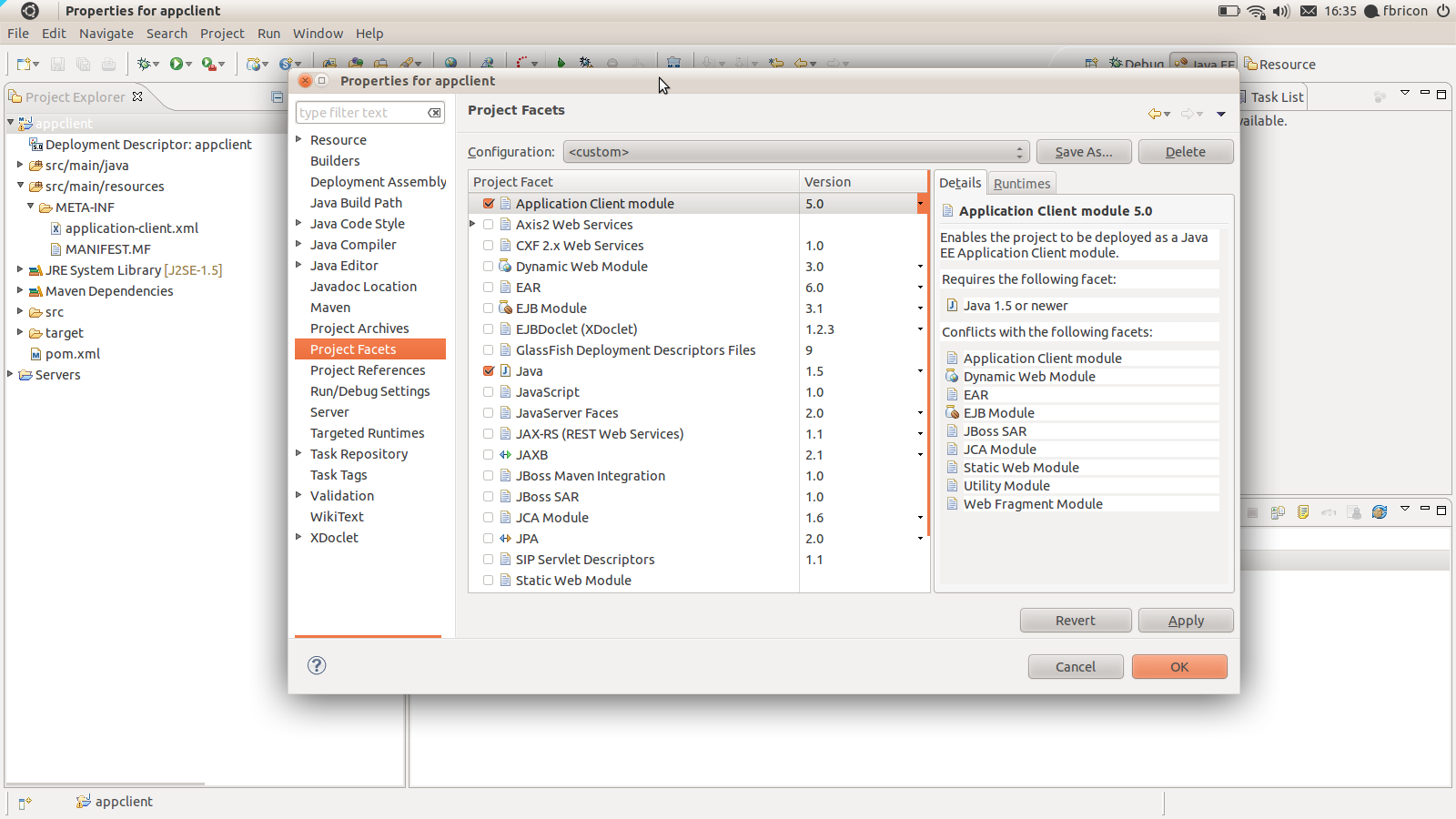
Application Client packaging has been introduced with the new maven-acr-plugin. Support for app-client type dependencies has been added in maven-ear-plugin 2.6. Since Application Client projects are natively supported in WTP, we added a new configurator for app-client projects. When an app-client project is imported / configured via m2e, the Application Client Facet will be automatically installed, its version inferred from the contents of META-INF/application-client.xml. Filtering of the deployment descriptor is supported.

<plugin>
  <groupId>org.apache.maven.plugins</groupId>
  <artifactId>maven-acr-plugin</artifactId>
  <version>1.0</version>
  <extensions>true</extensions>
  <configuration>
    <archive>
      <manifest>
        <mainClass>foo.bar.appclient.Main</mainClass>
      </manifest>
    </archive>
    <filterDeploymentDescriptor>true</filterDeploymentDescriptor>
  </configuration>
</plugin>

appclient.png

New support for Web Fragment projects

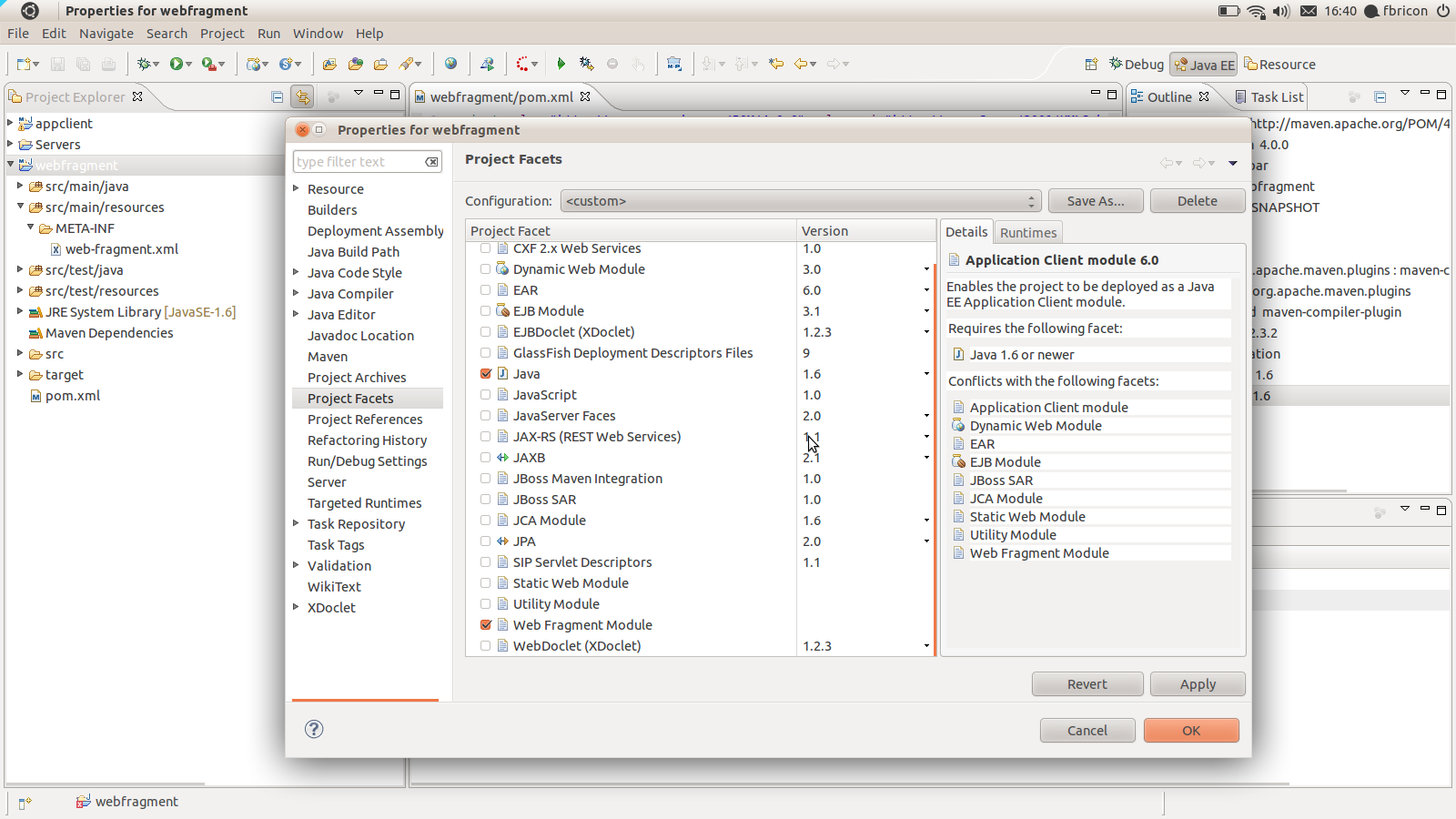
If a project contains a META-INF/web-fragment.xml in it's compilation output folder, the Web Fragment Facet is automatically installed upon maven project configuration (the Utility Facet is removed if necessary). Note that, as per the Java EE6 spec - and WTP is very picky about it-, Web Fragment projects *must* use Java 1.6. Failure to comply will fail the configuration and an error marker will be displayed.

webfragment.png

The use of target/m2e-wtp/web-resources is now optional

On some occasions however, having target/m2e-wtp/web-resources/ might cause some troubles (incompatibilities with WTP editors, IBM RAD, using Servlet.getRealPath(...) in your code).
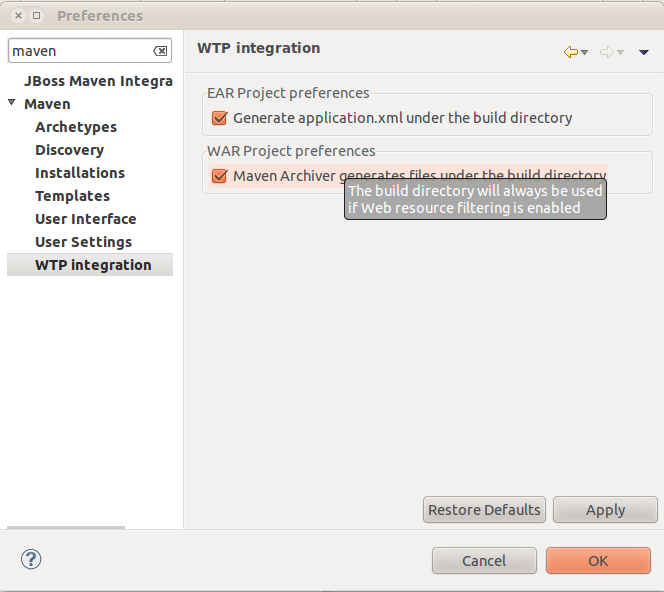
As a workaround, you can choose to not use target/m2e-wtp/web-resources/ and generate the pom.properties and MANIFEST.MF files in your source directory instead (It'll be your responsibility to add these files to your SCM ignore list).
In order to remove target/m2e-wtp/web-resources/ from the list of deployed folders, you need to change some preferences :
  • on your project only : right-click on the project > Properties > Maven > WTP : check "Enable Project Specific Settings" and uncheck "Maven Archiver generates files under the build directory"
  • on the whole workspace : Window > Preferences > Maven > WTP : uncheck "Maven Archiver generates files under the build directory"

war-preferences.png
Please note that this setting will be overridden if web resource filtering is in use, that is if the maven-war-plugin configuration declares <webResources> or sets <filterDeploymentDescriptor> to true. The reason is simple : you don't want to see your source files overwritten by the filtering mechanism (and it would also lead to some not-so-funny build loops).

Custom file name mapping for web project dependencies

Since the maven-war-plugin allows file name customization for librairies and TLDs, based on patterns (http://maven.apache.org/plugins/maven-war-plugin/examples/file-name-mapping.html), we added the the same feature in m2e-wtp. That will allow you to use a version-less name mapping for dependencies, like :

<plugin>
  <groupId>org.apache.maven.plugins</groupId>
  <artifactId>maven-war-plugin</artifactId>
  <version>2.1.1</version>
  <configuration>
    <outputFileNameMapping>@{groupId}@-@{artifactId}@.@{extension}@</outputFileNameMapping>
  </configuration>
</plugin>

The trick here is, in order to support non default filename mappings of dependencies listed in the Maven Library, the artifact is copied to the build directory (the target/ folder by default) under its new name. So if you happen to run a clean build of your project, wiping out that directory, you will need to manually run "Maven > Update Project configuration" on your project.

Option to not publish overlay changes automatically

In order to support publishing of overlay changes automatically, m2e-wtp aggressively cleared the cache of the servers your application is deployed to. However, The overlay feature still being in an experimental state, we decided to be more conservative with regard to server publishing, so a new "Automatically republish servers on overlay modification" preference has been added to Window > Preferences > Server > Overlays.

overlay-republishing-preference.png
Overlays support is not bound to Maven, that's why it's under the Server preferences.

Support for the new tag="defaultRootSource" introduced in WTP 3.3.1

When several source folders are declared in the .settings/org.eclipse.wst.common.component file, WTP prior to 3.3.1 (Indigo SR1) tended to generate files (web.xml, faces-config.xml, ...) in the first folder it found. Since web projects define target/m2e-wtp/web-resources as the first source folder (target/m2e-wtp/ear-resources/ for EAR projects), that would cause some issues. In WTP 3.3.1, a new tag has been introduced, designed to indicate which source folder should be used by default, when files need to be looked for / generated. m2e-wtp now adds this tag when WTP 3.3.1 is installed :

<project-modules id="moduleCoreId" project-version="1.5.0">
    <wb-module deploy-name="web-0.0.1-SNAPSHOT">
        <wb-resource deploy-path="/" source-path="/target/m2e-wtp/web-resources"/>
        <wb-resource deploy-path="/" source-path="/src/main/webapp" tag="defaultRootSource"/>
        <wb-resource deploy-path="/WEB-INF/classes" source-path="/src/main/java"/>
         <property name="context-root" value="multi-web"/>
        <property name="java-output-path" value="/multi-web/target/classes"/>
    </wb-module>
</project-modules>

A bit of documentation

As many projects, unfortunately, m2e-wtp doesn't shine in the documentation area. I've been using the github Wiki (https://github.com/sonatype/m2eclipse-wtp/wiki) to start a relatively modest FAQ. I'm planning on adding more content in the near future, but I'm also hoping the community at large will want to contribute some docs of its own. You just need a github account to be able to edit the Wiki.


As always, if you find any issue, please open a bug report at https://issues.sonatype.org/browse/MECLIPSEWTP (and don't forget to attach some test projects).

Happy coding.

Fred.
https://twitter.com/#!/fbricon

(the article above is copied verbatim from Planet JBoss)

Hendy's personal note:
To learn more about Java Web Development using Eclipse IDE and Java EE 6, I highly recommend The Java EE 6 Tutorial: Basic Concepts (4th Edition) (Java Series) by Eric Jendrock, Ian Evans, Devika Gollapudi and Kim Haase.

Tuesday, April 12, 2011

JSF 2.0 Cookbook [Java EE 6 Book]


Looking for a JSF 2.0 book that covers Java EE 6 web development? JSF 2.0 Cookbook from Packt Publishing might be what you're looking for.

The JSF 2.0 Cookbook contains step-by-step instructions for JSF users to build desktop-style interfaces in their own web applications. The book is designed so that you can refer to it chapter by chapter, or you can look at the list of recipes and read them in no particular order. This book is for two types of audience: Newcomers who know the basics of JSF but are yet to develop real JSF applications. JSF developers who have previous experience but are lacking best practices and a standard way of implementing functionality.

Written by Anghel Leonard:

The author is a senior Java developer with more than 12 years of experience in Java SE, Java EE, and the related frameworks. He has written and published more than 20 articles about Java technologies and more than 100 tips and tricks. He has also written two books about XML and Java (one for beginners and one for advanced developers). During this time, he has developed web applications using the latest technologies on the market. In the past two years, he has focused on developing RIA projects for GIS fields. He is interested to bring on web as much desktop as possible, therefore GIS applications represents a real challenge for him.

Some reviews:

I give Anghel Leonard's JSF 2.0 Cookbook ([...]) a qualified recommendation, but with a couple of caveats. Certainly he succeeds in providing JSF recipes that, taken as a whole, are worthwhile for the typical developer to know.

I would also like to recommend this book to anybody who is interested in what can be achieved server side, very quickly and with little prior knowledge. JSF 2.0 cookbook explains well how JSF can be used in conjunction other technologies. 

This book covers the new features of JSF 2 in the form of about 100 hundred recipes. In my opinion these recipes give a good overview of the new capabilities of the latest version of JSF. 

Disclosure: I am compensated from products you buy on Amazon.com.

Tuesday, March 2, 2010

How to Setup Java EE Web Development Environment on Eclipse IDE

Setting up a Java EE Web project like Cyclos in Eclipse IDE can be confusing at times. Here I'll show you how.

You need to get Eclipse Java EE Edition or SpringSource Tool Suite. I recommend SpringSource Tool Suite since it contains essential Java EE environment plus enterprise-grade Tomcat (SpringSource tc Server).
  1. Get the Cyclos distribution with sources here 
  2. In Eclipse/STS, File > New > Create a Dynamic Web Project
    - Under Project contents. Uncheck "use defaults" and choose your Cyclos root directory.
    - Target runtime: Tomcat (default)
    - Dynamic web module version: 2.5
    - Configuration: Default Configuration for Apache Tomcat v6.0 3.
  3. Click Next until you get to "Web Module" page.
    - For web module content directory, change to "web".
    - Uncheck "Generate web.xml deployment descriptor".
    - Finish
 It'll start rebuilding the project and the longest process is Validating JSPs...

Although I did the above process for Cyclos project, it can be used for any web project, as long as you recognize the structure (the most important is where the Java sources directory and the webapp directory).

Good luck!

For further resource on Java EE Web Development with Eclipse, get The Java Developer's Guide to Eclipse, 2nd Edition.

Friday, February 19, 2010

NullPointerException on JSP page on JSF+PrimeFaces

My first experience with JSF is with JSF 2.0 + PrimeFaces 2.0 and PDL/Facelets. ;-) When I went back to JSF 1.2 + PrimeFaces 1.0 using JSP templates I get this error.

java.lang.NullPointerException
at org.primefaces.component.resources.ResourcesTag.setProperties(ResourcesTag.java:37)
at javax.faces.webapp.UIComponentClassicTagBase.findComponent(UIComponentClassicTagBase.java:614)
at javax.faces.webapp.UIComponentClassicTagBase.doStartTag(UIComponentClassicTagBase.java:1142)
at org.apache.jsp.RequiredSecurityInfo_jsp._jspx_meth_p_005fresources_005f0(RequiredSecurityInfo_jsp.java:274)

I wish the errors would be more helpful.

Solution:

When using JSP view technology, JSF tags including p:resources should be wrapped inside f:view.

Source: Problem with <p:resources/>

Wednesday, February 17, 2010

JSF 1.2 + JSP and Facelets error - java.lang.RuntimeException: Cannot find FacesContext

I've just finished installing Facelets on my JSF 1.2 tutorial when I got this error message:
HTTP Status 500 -

type Exception report

message

description The server encountered an internal error () that prevented it from fulfilling this request.

exception

org.apache.jasper.JasperException: An exception occurred processing JSP page /index.jsp at line 13

10: <%@page import="java.util.List"%>
11: <%@page import="identity.Identifiable"%>
12: <%@page import="name.Nameable"%>
13: <f:view>
14: <html>
15: <head>
16: <meta http-equiv="Content-Type" content="text/html; charset=UTF-8">


Stacktrace:
 org.apache.jasper.servlet.JspServletWrapper.handleJspException(JspServletWrapper.java:505)
 org.apache.jasper.servlet.JspServletWrapper.service(JspServletWrapper.java:416)
 org.apache.jasper.servlet.JspServlet.serviceJspFile(JspServlet.java:342)
 org.apache.jasper.servlet.JspServlet.service(JspServlet.java:267)
 javax.servlet.http.HttpServlet.service(HttpServlet.java:717)

root cause

java.lang.RuntimeException: Cannot find FacesContext
 javax.faces.webapp.UIComponentClassicTagBase.getFacesContext(UIComponentClassicTagBase.java:1855)
 javax.faces.webapp.UIComponentClassicTagBase.setJspId(UIComponentClassicTagBase.java:1672)
 org.apache.jsp.index_jsp._jspService(index_jsp.java:93)
 org.apache.jasper.runtime.HttpJspBase.service(HttpJspBase.java:70)
 javax.servlet.http.HttpServlet.service(HttpServlet.java:717)
 org.apache.jasper.servlet.JspServletWrapper.service(JspServletWrapper.java:374)
 org.apache.jasper.servlet.JspServlet.serviceJspFile(JspServlet.java:342)
 org.apache.jasper.servlet.JspServlet.service(JspServlet.java:267)
 javax.servlet.http.HttpServlet.service(HttpServlet.java:717)

note The full stack trace of the root cause is available in the Apache Tomcat/6.0.20 logs.
Apache Tomcat/6.0.20
This happens because:
  • I've added Facelets to the web project
  • I have set up the JSF default suffix to *.xhtml and JSF view technology to Facelets
  • I have a JSF+JSP page
This exact question on java.net Forums : Is that possible/good to mix the ... leads to this FAQ on How do I use Facelets and JSP in the same application?:
You have to use prefix mapping for the Facelets pages in order for this to work. Leave the DEFAULT_SUFFIX with the JSF default of .jsp. Configure the Facelet's VIEW_MAPPINGS parameter:
<web-app>
  <context-param>
    <param-name>javax.faces.DEFAULT_SUFFIX</param-name>
    <param-value>.jsp</param-value>
  </context-param>

  <!-- Facelets pages will use the .xhtml extension -->
  <context-param>
    <param-name>facelets.VIEW_MAPPINGS</param-name>
    <param-value>*.xhtml</param-value>
  </context-param>     

  <servlet>
    <servlet-name>Faces Servlet</servlet-name>
    <servlet-class>javax.faces.webapp.FacesServlet</servlet-class>
  </servlet>
 
  <!-- Use prefix mapping for Facelets pages, e.g. http://localhost:8080/webapp/faces/mypage.xhtml -->
  <servlet-mapping>
    <servlet-name>Faces Servlet</servlet-name>
    <url-pattern>/faces/*</url-pattern>
  </servlet-mapping>
</web-app>
The best way is, of course... to get rid of JSP pages and use Facelets exclusively. :-)

But at least now you know you have a choice. :-)

If you're still using JSF 1.2 I heavily recommend you to upgrade to JSF 2.0 as soon as possible. Check out the book JavaServer Faces 2.0, The Complete Reference which is a great resource on using JSF 2.0.

JSF 1.2 + PrimeFaces Web Application Tutorial using Eclipse IDE

Setting up a full stack web application with JSF 1.2 Java web framework takes some work. Here I will show you the "mostly manual" way aka non-Ruby on Rails-style.

The project will:
  • Use Eclipse Java EE (aka JDT + WTP)
  • Not use Maven
  • Deployed on Tomcat
  • Use PrimeFaces JSF component library
Why?
I know you're smart enough that this is the hard way. Considering there is AppFuse, Maven archetypes, and SpringSource Tool Suite projects templates to help you start a Java web project the Ruby on Rails way. The reason is because:
  • Educational purposes
  • Make it easy to depend on non-Maven libraries or our own Eclipse projects
Steps
  1. Create new Dynamic Web project in eclipse, select JSF 1.2.
  2. Download JSF-RI (Mojarra) 1.2 either manually or automatically
  3. Make sure to export on Java EE dependencies to get libs on WEB-INF/lib (aka compile vs provided)
  4. Add el-impl dependency and export. This is needed for deploying to Tomcat, not needed for Glassfish other complete Java EE containers.
  5. Download PrimeFaces 1.x and export
  6. PrimeFaces Resources Servlet
  7. PrimeFaces p:resources (JSF 1.x only)
  8. Put f:view on JSP pages (mandatory) -- see forum thread about NullPointerException on p:resources
  9. Beans -> faces-config.xml  . Eclipse IDE helps here, but now you know annotations are much nicer.
Setup Facelets

  1. Download Facelets as dependency and export to WEB-INF/lib
  2. Configure WEB-INF/web.xml

     <!-- Use Documents Saved as *.xhtml -->
     <context-param>
      <param-name>javax.faces.DEFAULT_SUFFIX</param-name>
      <param-value>.xhtml</param-value>
     </context-param>
     <!-- Special Debug Output for Development -->
     <context-param>
      <param-name>facelets.DEVELOPMENT</param-name>
      <param-value>true</param-value>
     </context-param>
     <!-- Optional JSF-RI Parameters to Help Debug -->
     <context-param>
      <param-name>com.sun.faces.validateXml</param-name>
      <param-value>true</param-value>
     </context-param>
     <context-param>
      <param-name>com.sun.faces.verifyObjects</param-name>
      <param-value>true</param-value>
     </context-param>
  3. Configure WEB-INF/faces-config.xml

     <application>
      <view-handler>com.sun.facelets.FaceletViewHandler</view-handler>
     </application>
  4. Install JBoss Tools for Facelets editor code completion and other JSF helpers. 
  5. IF you opt for not installing JBoss Tools in the previous step:
    - Configure *.xhtml to be opened with JSP Editor. Open Eclipse Preferences,  go to Window > Preferences > General > Content Types:  Text > JSP > Add (xhtml).
    - Configure Eclipse File Type associations to open *.xhtml as JSP Editor by default, not the Doxia Xhtml editor (which is very slow and not helpful).
  6. Create a sample page.

    <!DOCTYPE html PUBLIC "-//W3C//DTD XHTML 1.0 Transitional//EN" "http://www.w3.org/TR/xhtml1/DTD/xhtml1-transitional.dtd">
    <html xmlns="http://www.w3.org/1999/xhtml"
     xmlns:ui="http://java.sun.com/jsf/facelets">
    <head>
    <meta http-equiv="Content-Type" content="text/html; charset=iso-8859-1" />
    <title>Facelets: Number Guess Tutorial</title>
    <style type="text/css">
    <!--
    body {
      font-family: Verdana, Arial, Helvetica, sans-serif;
      font-size: small;
    }
    -->
    </style>
    </head>
    
    <body>
    <h1> <ui:insert name="title">Default Title</ui:insert> </h1>
    <p> <ui:insert name="body">Default Body</ui:insert> </p>
    </body>
    
    </html>
  7. Redeploy the web app!

To Do
  1. Add Facelets
  2. Add Spring
  3. Add JPA
  4. Add Spring Transactions
  5. Add Spring Security
  6. Unit Testing

Tuesday, February 16, 2010

Facelets tag library not loading?

I got a weird and frustrating problem today with JSF 2.0, Facelets (aka PDL), and Tomcat. I installed PrimeFaces to my web application, and it's not working at all.

"Not working" in the sense that there are no error messages, and my PrimeFaces tags are output verbatim. In a sense, PrimeFaces became 'unresolved namespace' in my web app.

I tried turning on Facelets logging but failed (I'm not so good with java.util.logging), maybe because PDL uses a different logging configuration than the "legacy" Facelets for JSF 1.2.

After hours of research, it turned out that the problem was simple: my primefaces-2.0.0.jar file is corrupt!

I used Maven to manage dependencies and I didn't realize that it did not download successfully (blame my flaky Internet connection.)

The real problem is that Tomcat did not give any indication whatsoever that one of my JARs is corrupt. Ridiculous!

Monday, February 15, 2010

Solving Tomcat + JSF 2.0 Error: java.lang.LinkageError: loader constraint violation

What happens when you try running JSF 2.0 web framework on Tomcat 6? This error:

HTTP Status 500 -


type Exception report
message
description The server encountered an internal error () that prevented it from fulfilling this request.
exception
javax.servlet.ServletException: java.lang.LinkageError: loader constraint violation: when resolving interface method "javax.servlet.jsp.JspApplicationContext.getExpressionFactory()Ljavax/el/ExpressionFactory;" the class loader (instance of org/apache/jasper/servlet/JasperLoader) of the current class, org/apache/jsp/index_jsp, and the class loader (instance of org/apache/catalina/loader/StandardClassLoader) for resolved class, javax/servlet/jsp/JspApplicationContext, have different Class objects for the type javax/el/ExpressionFactory used in the signature org.apache.jasper.servlet.JspServlet.service(JspServlet.java:275) javax.servlet.http.HttpServlet.service(HttpServlet.java:717) root cause
java.lang.LinkageError: loader constraint violation: when resolving interface method "javax.servlet.jsp.JspApplicationContext.getExpressionFactory()Ljavax/el/ExpressionFactory;" the class loader (instance of org/apache/jasper/servlet/JasperLoader) of the current class, org/apache/jsp/index_jsp, and the class loader (instance of org/apache/catalina/loader/StandardClassLoader) for resolved class, javax/servlet/jsp/JspApplicationContext, have different Class objects for the type javax/el/ExpressionFactory used in the signature org.apache.jsp.index_jsp._jspInit(index_jsp.java:25) org.apache.jasper.runtime.HttpJspBase.init(HttpJspBase.java:52) org.apache.jasper.servlet.JspServletWrapper.getServlet(JspServletWrapper.java:159) org.apache.jasper.servlet.JspServletWrapper.service(JspServletWrapper.java:329) org.apache.jasper.servlet.JspServlet.serviceJspFile(JspServlet.java:342) org.apache.jasper.servlet.JspServlet.service(JspServlet.java:267) javax.servlet.http.HttpServlet.service(HttpServlet.java:717) note The full stack trace of the root cause is available in the Apache Tomcat/6.0.20 logs.

Apache Tomcat/6.0.20

The problem is simple: Tomcat ships with an old version of el-api, the Expression Language used by JSP, JSTL, and JSF.

JSF 2.0 uses the new Java EE 6 version that is EL 2.2. Unfortunately you can't just put the new EL libraries in your WEB-INF/lib because of Tomcat's restriction.

To fix this, you don't need to change your project.. but you need to patch your Tomcat installation:
  1. Delete el-api.jar from your Tomcat's lib folder.
  2.  Get the new el-api-2.2.jar from java.net and save it as el-api.jar on the Tomcat's lib folder.
You will also need to put the new el-impl.jar on your web application's WEB-INF/lib folder.

For a Maven web project, put this in your pom.xml :
                <dependency>
                    <groupId>javax.el</groupId>
                    <artifactId>el-api</artifactId>
                    <version>2.2</version>
                    <scope>provided</scope>
                </dependency>
                <dependency>
                    <groupId>org.glassfish.web</groupId>
                    <artifactId>el-impl</artifactId>
                    <version>2.2</version>
                    <scope>runtime</scope>
                </dependency>
You also need to use java.net's Maven repository:
<repositories>
    <repository>
        <id>java.net.m2</id>
        <url>http://download.java.net/maven/2</url>
        <snapshots>
           <enabled>false</enabled>
        </snapshots>
    </repository>
</repositories>
Related Articles:

Solving "JasperException: The absolute uri: http://java.sun.com/jsp/jstl/core cannot be resolved"

I believe that any Java EE Web developer working with Spring, Tomcat, JSP, and JSTL has gone through this error at least once:
org.apache.jasper.JasperException: The absolute uri: http://java.sun.com/jsp/jstl/core cannot be resolved in either web.xml or the jar files deployed with this application
 org.apache.jasper.compiler.DefaultErrorHandler.jspError(DefaultErrorHandler.java:51)
 org.apache.jasper.compiler.ErrorDispatcher.dispatch(ErrorDispatcher.java:409)
 org.apache.jasper.compiler.ErrorDispatcher.jspError(ErrorDispatcher.java:116)
 org.apache.jasper.compiler.TagLibraryInfoImpl.generateTLDLocation(TagLibraryInfoImpl.java:315)
 org.apache.jasper.compiler.TagLibraryInfoImpl.<init>(TagLibraryInfoImpl.java:148)
 org.apache.jasper.compiler.Parser.parseTaglibDirective(Parser.java:429)
 org.apache.jasper.compiler.Parser.parseDirective(Parser.java:492)
 org.apache.jasper.compiler.Parser.parseElements(Parser.java:1439)
 org.apache.jasper.compiler.Parser.parse(Parser.java:137)
 org.apache.jasper.compiler.ParserController.doParse(ParserController.java:255)
 org.apache.jasper.compiler.ParserController.parse(ParserController.java:103)
 org.apache.jasper.compiler.Compiler.generateJava(Compiler.java:170)
 org.apache.jasper.compiler.Compiler.compile(Compiler.java:332)
 org.apache.jasper.compiler.Compiler.compile(Compiler.java:312)
 org.apache.jasper.compiler.Compiler.compile(Compiler.java:299)
 org.apache.jasper.JspCompilationContext.compile(JspCompilationContext.java:586)
 org.apache.jasper.servlet.JspServletWrapper.service(JspServletWrapper.java:317)
 org.apache.jasper.servlet.JspServlet.serviceJspFile(JspServlet.java:342)
 org.apache.jasper.servlet.JspServlet.service(JspServlet.java:267)
 javax.servlet.http.HttpServlet.service(HttpServlet.java:717)
This means that Tomcat cannot find the JSTL library.

If you use Maven, simply add this dependency to your pom.xml (inside <dependencies>):
        <dependency>
         <groupId>javax.servlet</groupId>
         <artifactId>jstl</artifactId>
         <version>1.2</version>
        </dependency

Make sure that you use the correct taglib meta-tag :
<%@ taglib prefix="c" uri="http://java.sun.com/jsp/jstl/core" %>

Exposing RESTful APIs with JAX-RS on Spring

JAX-RS is the way to expose RESTful APIs using Java.

Since JAX-RS is a standard/specification, several implementations exist:
All of them should work with Spring, making it easy for you to use Spring dependency injection and other goodies with JAX-RS methods.

Don't forget to mark the JAX-RS beans as @Scope("request") because REST APIs should be stateless.

There's nothing forbidding you to use Singleton or other scoping though.

Sending HTTP Error Response from JAX-RS Method

Whether you use Apache CXF, Restlet, or Jersey, JAX-RS (JSR-311) gives you a standard way of sending RESTful HTTP Response with error status code.

All you need to do is throw javax.ws.rs.WebApplicationException. You don't have to change the method signature, you can still return the normal domain class when the method is successful.

 @Path("{id}")
 public SessionResource getSession(@PathParam("id") String id) {
  try {
   // ...........
  } catch (IllegalArgumentException e) {
   throw new WebApplicationException(e, Status.NOT_FOUND);
  }
 }
That's it!

Friday, February 12, 2010

Writing Facelets Composite Component in JSF 2.0

JSF 2.0 is making it easier for Java EE web developers to write composite components.

Composite components are reusable custom HTML fragments + presentation logic.

I said "easier" because in JSF 1.x it was horrible. Now it's manageable, but not necessarily easier than other frameworks, like Tapestry or Wicket. At least it can compete on a similar level.

To create a composite component, write a view using Facelets XHTML like this example:
<?xml version='1.0' encoding='UTF-8' ?>

<!DOCTYPE html PUBLIC "-//W3C//DTD XHTML 1.0 Transitional//EN" "http://www.w3.org/TR/xhtml1/DTD/xhtml1-transitional.dtd">

<html xmlns="http://www.w3.org/1999/xhtml"

      xmlns:composite="http://java.sun.com/jsf/composite">

    <composite:interface>

        <composite:attribute name="title" required="true" />

    </composite:interface>

    <composite:implementation>

        <div style="background: red; color: yellow">

            #{cc.attrs.title}

        </div>

        <div style="border: 1px solid green">

            <composite:insertChildren />

        </div>

    </composite:implementation>

</html>
Save the XHTML code above as resources/ezcomp/titleBorder.xhtml.

Composite components live under resources folder, and the namespace will be determined from the subfolder name.

Use the ezcomp:titleBorder component like this:
<?xml version='1.0' encoding='UTF-8' ?>

<!DOCTYPE html PUBLIC "-//W3C//DTD XHTML 1.0 Transitional//EN" "http://www.w3.org/TR/xhtml1/DTD/xhtml1-transitional.dtd">

<html xmlns="http://www.w3.org/1999/xhtml"

      xmlns:h="http://java.sun.com/jsf/html"

      xmlns:ezcomp="http://java.sun.com/jsf/composite/ezcomp">

    <h:head>

        <title>Composite Component Demo</title>

    </h:head>

    <h:body>

        <ezcomp:titleBorder title="Cool stuff">

            So happy to be here!

        </ezcomp:titleBorder>

    </h:body>

</html>
Not bad, is it? ;-)

Related posts:

JSF 2.0 RESTful URLs with PrettyFaces

JSF's RESTless nature is a big problem to some Java EE web developers. Not everybody cares, unfortunately I'm coming from a Ruby on Rails background so I'm one of the guys who cares.

In JSF, by default every page transition is done using HTTP POST. Even when you use JSF's GET support aka bookmarkable URLs, you still don't get the pretty SEO-friendly URLs that frameworks like Ruby on Rails generate by default.

Lucky you and me, there is a solution: PrettyFaces by OcpSoft.

Checkout the  PrettyFaces slideshare presentation below on why pretty, bookmarkable, SEO-friendly URLs are important for a JSF web application; and how to do it.

Thursday, February 4, 2010

What is the Best Java Web Framework?

If you're looking for the best web framework for your Java EE project, which one will you choose?

First of all you should decide what kind of web framework are you looking for, action-based or component-based, or else.

Action-based means that the web application is fundamentally page-oriented, where HTTP requests are dispatched to a specific controller and then responded.

Component-based means that the web application is more about components than pages. You develop your web application similar to developing desktop GUI applications and Flex RIAs.

Service-oriented web applications are those that provide REST APIs and generally consume and produce JSON, XML, or Atom... not HTML. This kind of applications will be discussed in another post (remind me, please!) :-)

Here are the frameworks that I recommend you should review.

Action-based Java Web frameworks

Component-based Java web frameworks 

Thanks to JSF 2.0, the choice in this category is simpler. JSF 2.0 comes with built-in AJAX support, which means you not only have a choice in component libraries but can mix-and-match them if you want.
At the time of this writing, most JSF 2.0 component libraries are still in beta testing phase.

For the JSF 2.0 implementation you have several choices: Mojarra, Apache MyFaces.

Other considerations.
  • JBoss Seam 3 (not yet released) since it has JSF 2.0 support.
So, what's your take? Let me know of your opinions.